
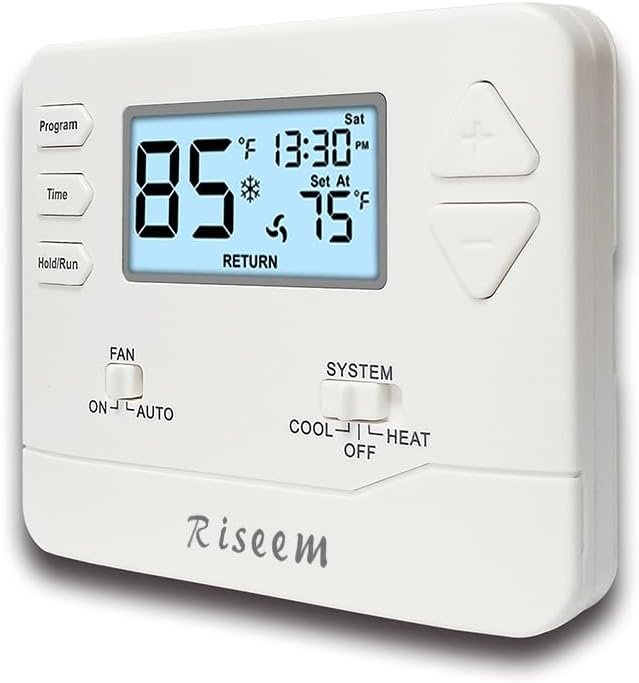
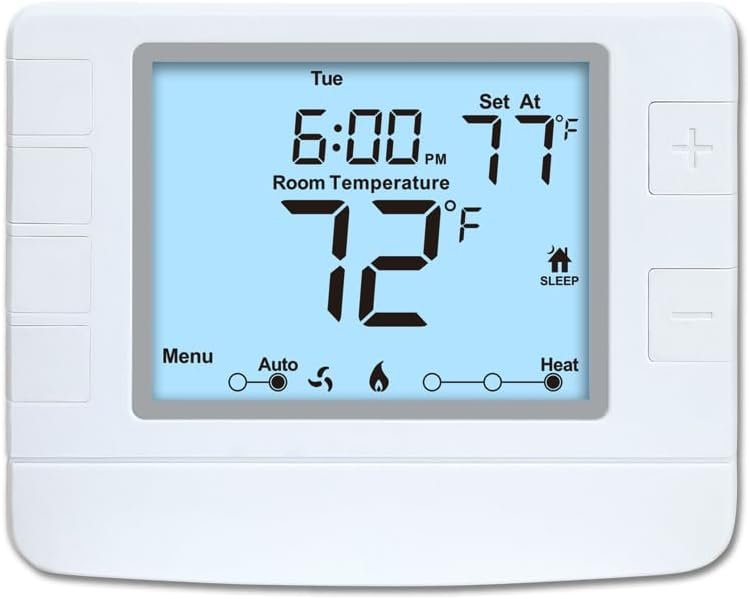
Programmable Thermostat for Home,Conventional Single-Stage Systems,5-1-1 Day Programmable Digital Energy-Saving Thermostat,up to 1 Heat/1 Cool Compatible with Gas System,White Backlight
$24.99
Related Products


Product description
STN605-White


STN605-White
High Compatibility: Forced air (gas, oil or electric), Electric furnace, Hot water steam or gravity radiant heat, Heat only systems, Heat pump w/o auxiliary or emergency heat, Millivolt, Gas fireplaces (24V), Floor or wall furnaces, Cool only systems.(TIP: Before purchasing, check to see if this thermostat is compatible with your system.)
Not Compatible: Heat pump with auxiliary or emergency heat, Dual fuel/hybrid heating, Electric baseboard heat (110-240 volts), Line voltage, Convectors, Radiant-ceiling heat, Mini split systems and 12V RV systems.
Easy to Install and Use: Large terminal blocks with universal sub-base, can be installed within 30 minutes, clear, easy-to-read backlight LCD display and easy controls make for a user-friendly experience.
Factory Pre-set Energy-efficiency Program:5/1/1 easy-to-understand programming menus, flexible programming lets you sync your comfort with your schedule.
Simple but Powerful Control: Easy-access front-load battery compartment, adjustable temperature differential (swing) for energy optimization and maximum system life, Support temperature display calibration, Convert °C/°F units, compressor delay protection (selectable on or off).
Dual Power Supply: Can be powered by 24VAC power or 2 AAA batteries, No common wire (C-wire) required on most systems (only required on heat only and cool only systems).
Reliability: Made by professional manufacturer and backed by over 20 years of experience, the customer service is 7*24 hrs available.
8 reviews for Programmable Thermostat for Home,Conventional Single-Stage Systems,5-1-1 Day Programmable Digital Energy-Saving Thermostat,up to 1 Heat/1 Cool Compatible with Gas System,White Backlight
Add a review
$24.99
Marna –
Fit for duty and more
Installation was relatively easy with just one confusing part with the jumper wire already inserted into the RH terminal. We have a single transformer system (heat only, no cooling), meaning there’s only one red wire to insert into the RH terminal. There’s no RC wire. So that meant the attached jumper wire must remain with one end in the RC terminal and the other in the RH terminal. (The other wire is yellow-colored and it went into the “W” terminal, while the third wire of green is a “stray” and left unattached to any terminal (I was advised our wiring was “unconventional” due to the older house).Our previous Honeywell thermostat has a small metal U-shaped (actually more of a horizontal bar with perpendicular ends) pin that connects the RC and RH. We were initially stumped how the red wire would fit into the RH terminal when it’s already occupied by the jumper wire. Figured the ends of both could squeeze into the hole. And they did.Tip is to take a photograph of your previous thermostat wiring setup before detaching for matching with the replacement.)The wall plate’s mounting holes matched exactly to the previous and existing anchors for the screws. So we didn’t need to drill new holes into the wall and we reused the existing screws to secure the wall plate of the new model.Perhaps the trickiest process is the hidden menu settings (where the AM/PM with a 12-hour clock or 24-hour clock could be switched to or otherwise the default is 12-hour but without the display of the AM or PM). Those settings are under the technician setup menu which is accessed by pressing both the + and – buttons at the same time for 3 seconds until the first screen displays the filter settings (indicated by “FL”).You need to press the “Program” button to cycle through the different menus for filter, room temperature calibration and so on until the 8th menu feature of the clock preference is reached. Under the tech setup menu, you can adjust the swing differential to the number of degrees (in increments of 0.1 degrees, starting from 0.2 and up to 2.0) of the drop in temperature for the furnace (there are separate swing differential settings for air conditioner of temperature increase) for the heat to turn back on. Ideally, you want to avoid short cycles, as the furnace may run too briefly and turn back on too frequently within an hour. The furnace should run long enough (10-15 minutes) so it burns hot enough for clean flames (minimal production of soot). (That’s what I learned from Gemini in my exploration of what the compressor delay relay does, which doesn’t apply to me without an air conditioner.) Disclaimer: Not a professional expert opinion.The thermostat has factory presets for the programmed schedule, which is outlined in a table chart on page 19. On weekdays, the heat turns on at 6 AM and sleeps at 10 PM, while weekends the times are shifted to 8 AM and 11 PM. You will likely want to modify those settings to your lifestyle – or if you’re like me, manually set the temperature during the day when you actually wake up and turn off by increasing/decreasing manually and pressing the HOLD/RUN button that overrides the programmed schedule. (But I did adjust the programmed schedule anyway to my schedule as backup from proactive control.)When defining the settings, press “Program” to cycle through the menu steps and adjust the settings with the “+” or “-” as needed to change them. Press “Time” to go to the previous screen/step. When done, save and exit by pressing “Hold/Run.” This applies for programming the heating/cooling schedule and preferences on the “techie” settings under the technician setup menu.The swing differential setting allows optimal managing the frequency of the furnace cycling (turning on and off), which my previous Honeywell didn’t have. This also means it will heat the house to the set temperature (but I’ve observed it’s on the generous side of 1 degree above), then turn the heat off and rest until the ambient temperature drops down to the differential number (I’ve set mine for 2 degrees, but I’m still tweaking the incremental degrees until the furnace hits the “sweet spot” of maybe 2 cycles per hour for 15 minutes running and 15 minutes idle).The thermostat is set to default as gas (gas and oil are same for this setting). So if your system is electric, you have to toggle the setting within the tech setup menu (there is no switch in the back despite the etched “gas” and “electric” on the back of the thermostat) as such.I have read complaints about the backlight being too dim. I have the white screen model and the screen is bright when any of the buttons is pressed to activate the screen. The black text stands out against the lit screen so readability is not an issue, especially when the numbers are huge (the room temperature reading that is, while the number for the temperature setting is smaller). Though I like blue, I didn’t think the black numbers/text against a blue screen were enough of a contrast to read. So not sure the reading problem mentioned might be due to the color choice or the thermostat screen dimming when idle (settings are not actively adjusted). Upside to the dimming would be less battery draining.Two high-quality AAA alkaline batteries are recommended. My previous setup was with two AAA 1100 mAh NiMH batteries, which worked fine for years with the Honeywell thermostat. But those needed more vigilance in replacing with at least each heating season. And I didn’t this winter season, which might have led to furnace issues (or it could have been with the Honeywell furnace, as well). To be on the safe side, I went with Energizer AAA lithium batteries (might be overkill but lithium batteries are supposed to long-lasting so I may be able to insert them and forget it … maybe at least for an entire year, if not more). (Yes, they are shockingly expensive, but peace of mind and a counter to laziness are priceless.) A low battery icon/symbol will appear on the screen when the battery becomes too low.A convenient feature by far is the front battery compartment where batteries can be removed and inserted by opening the front door/hatch. No need to pull the unit off the back plate, as I had with the previous Honeywell.I cannot attest to the durability of the Riseem (just had it installed, which started the furnace seamlessly – much to our relief with the furnace out while we waited the full 7 days for the thermostat’s delivery (no, I don’t have Prime)) but I have read positive testaments elsewhere. The functionality and protective features alone have impressed me enough.
Joe –
Solid product
Very good product. Very easy to install and reliable. It has been in operation about one year now and no issues at all
Amazon Customer –
It Works!
Easy to install. Not the best quality materials, but works well.
Amazon Customer –
Stable heat
Everything I was looking for in a replacement thermostat. I don’t care much for the “smart” devices, the ones that either listen or operate from a phone and this was just the ticket. Easy to program, easy to read, and easy to turn the heat up or down on the fly. Very pleased with the purchase.
Barbara K W –
Easy to install
This thermostat was very easy to install and is working great. Temperature control is perfect. Value is excellent. The hardest thing for us was trying to get it programmed. Had to try a couple different times but finally got it. Needless to say I’m no the most tech savvy person. Large numbers make it very easy to see the numbers but when programming the dates are small at least for my old eyes.
John A –
Great product
I’ve looked for years for a millivolt programmable thermostat. This is the real deal. Excellent product
Donald S. Sluyk –
Very easy to install and program
I bought three of these to replace three non-programmable thermostats after getting a $700 electric bill. Now I can program around on-peak, demand charges and super off-peak.I bought a Honeywell Wifi programmable thermostat,but returned it because it was more difficult to configure and program.I don’t really need wifi and that made it complicated.The other thing I like about this one, besides being less than half the price, is that it can be programmed without being attached to the base because it has batteries.Great product and great price.
Duckie mom –
Not easily programmed
It works. Hard to program. Has 4 daily settings and it’s a lot to try to set up. If you are looking for simple try some thing else. Yes I read the instructions even went looking for a video. It’s still not right but it’s working